Wazuh Goes Live: Building the SIEM and Chasing Down False Positives
The SIEM decision sat open for two posts. Wazuh over Elastic Stack, and the reasoning is simple: Wazuh ships with a working ruleset and MITRE ATT&CK mapping out of the box, while Elastic gives you a search engine and expects you to build the detection logic yourself. For a lab meant to produce real SOC-analyst reps, not a general-purpose data platform, turnkey wins.
The VM went up the same way everything else in this lab has: all-in-one install (manager, indexer, and dashboard on one host), same Proxmox conventions as the other VMs, sitting on the isolated 10.x.x.0/24 lab subnet at 10.x.x.12. First move after login was changing the installer’s default admin password. Second move was picking a first data source.
Two data sources, two different problems
The straightforward one first: a Wazuh agent on ubuntu-server-01, installed from the apt repo, pointed at the manager with WAZUH_MANAGER, registered as agent 001. Agent enrollment is mechanical. Install, set one environment variable, restart the service, done. The manager also monitors itself through journald as agent 000, which I only noticed because running sudo on the Wazuh box triggered its own PAM and sudo rules. A SIEM monitoring its own admin activity is a small detail, but it’s the kind of thing you want confirmed rather than assumed.
The harder one was OPNsense. No agent runs on a firewall appliance, so this had to be agentless: OPNsense forwards syslog over UDP 514 to the Wazuh manager, which listens for it on a second <remote> block in ossec.conf alongside the existing agent-connection block. First attempt didn’t work. OPNsense’s syslog-ng process wasn’t picking up the new forwarding target on a config save, no packets showed up on the Wazuh side at all. Fix was a disable, Apply, re-enable, Apply cycle on the syslog target, confirmed with tcpdump on the Wazuh VM once packets actually started landing.
Verifying the parser instead of assuming it
Getting syslog to arrive is not the same as getting it understood. OPNsense’s firewall log format (filterlog) is a dense CSV string, and the real question was whether Wazuh’s decoder was actually breaking it into fields or just storing it as an unparsed blob. I didn’t want to guess, so I turned on full archiving (logall and logall_json, temporarily) and read the raw output directly.
The decoder is named pf, not pfsense, and it works. Every filterlog entry came through with srcip, dstip, srcport, dstport, protocol, and action populated as real structured fields, not buried in a text blob. Better, actual rules were already firing on the parsed data: rule 87701 for individual firewall drop events, and rule 87702 for multiple drops from the same source in a short window, tagged with MITRE ATT&CK T1110 (Brute Force). The pipeline worked end to end on the first real traffic it saw. I turned the full archiving back off immediately afterward. Logging everything indefinitely will fill a disk fast, and this lab has already lost one to that exact mistake during an unrelated vulnerability feed sync.
The false positive that wouldn’t quit
Rule 87702 started firing every four minutes. Level 10, MITRE-tagged as brute force credential access, and completely wrong. Nothing was attacking anything. A device on the home LAN, later identified as a Sonos speaker, was broadcasting multicast discovery packets on ports the standard mDNS and SSDP rules don’t cover, hitting OPNsense’s default-deny rule over and over, and tripping the frequency threshold on ordinary background chatter.
First attempt at fixing it was wrong in an instructive way. I wrote a custom rule in local_rules.xml to suppress 87701, the individual drop event, assuming that starving the correlation rule’s input would stop it from firing. It didn’t. Turned out 87701 already has no_log set in Wazuh’s own ruleset, so it never displayed in the dashboard in the first place, suppressing it further changed nothing. More importantly, the frequency tracking behind 87702 (if_matched_sid=87701) registers a match the moment 87701’s conditions are satisfied, before any more specific child rule gets a chance to intercept the event. I was solving a problem that had already been solved by Wazuh’s own default configuration, while leaving the actual noisy rule untouched.
The right target was 87702 itself. A rule can be chained off a frequency or correlation rule the same way it chains off any other rule ID, so the fix was <if_sid>87702</if_sid> combined with a destination match, set to level 0. Once scoped to the Sonos speaker’s actual destinations (224.0.0.7 and 239.255.255.250, both inside the 224.0.0.0/4 multicast range), the correlation alert stopped firing for that traffic while still firing normally for anything else.
It didn’t stay fixed for long. A second device, the router itself, surfaced the same correlation pattern a few hours later, this time broadcasting to 255.255.255.255, the limited broadcast address, which the multicast rule doesn’t cover. Third rule, same pattern, different destination. That’s not a design flaw in the approach. It’s what tuning a SIEM against a real, messy home network actually looks like: you don’t discover every noisy device on day one, you discover them one alert storm at a time.
A few syntax lessons came out of this that are worth writing down before I forget them. Fields like dstport, dstip, and action are “static” fields in Wazuh’s rule engine and need dedicated XML tags (<dstport>, not <field name="dstport">); the generic <field name="..."> syntax is for custom fields the decoder doesn’t already know about. dstip gets validated as a real IP address or CIDR block, not a regex, so pattern matching against it fails outright. Comma-separated multiple values in a single dstip tag didn’t behave reliably in this version, splitting into separate single-value rules was more reliable than fighting it. And testing a frequency rule in wazuh-logtest needs more than one log line, since the tool only evaluates what you feed it in that session; piping eighteen copies of the same line into one session was the only way to actually cross the eighteen-in-forty-five-seconds threshold and confirm the override caught it.
Where it stands
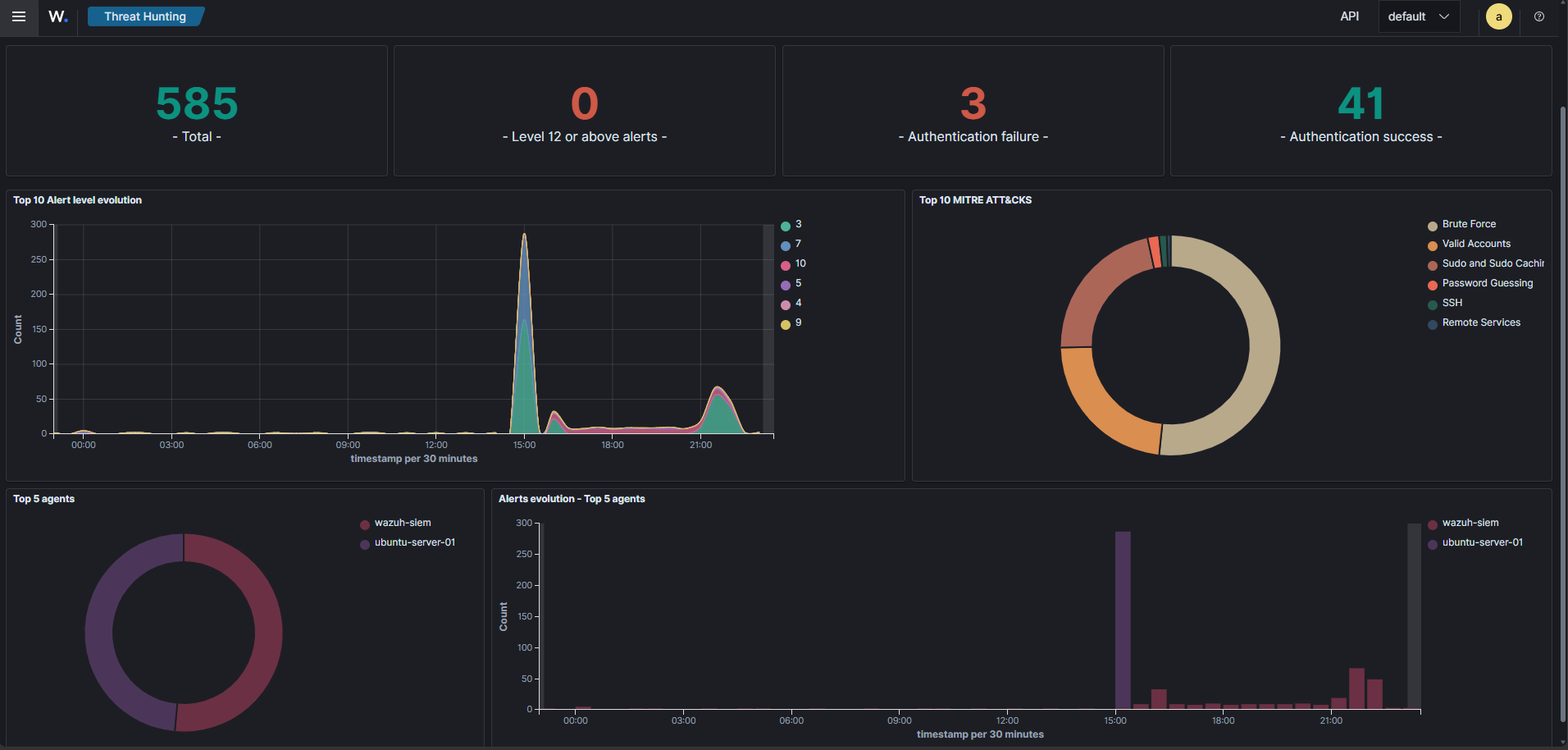
Confirmed live, not just in a test tool: the dashboard’s firewall-block query went flat immediately after the last manager restart and stayed flat through a full observation window. Real drop events and real correlation alerts still fire for anything hitting a specific host. Only the known-benign multicast and broadcast chatter gets swallowed, and each suppression rule documents exactly why it exists.
Next data sources are the ThinkPad and the MSI, enrolled as Wazuh agents over the existing Tailscale route into the lab subnet. That’s the piece that actually closes the original goal for this whole project: getting real home network activity into a SIEM I built and tuned myself, not a vendor demo environment with the noise already filtered out for me.